A few things to keep in mind while completing this activity:
- Do not use the browser Back button or close or reload any exam windows during the exam.
- Do not close Packet Tracer when you are done. It will close automatically.
- Click the Submit Assessment button in the browser window to submit your work.
Introduction
In this assessment, you will configure devices in an IPv4/IPv6 network. For the sake of time, you will not be asked to perform all configurations on all network devices as you may be required to do in a real network or other assessment. Instead, you will use the skills and knowledge that you have learned in the labs and packet tracers in this course to configure the Town Hall router. In addition, you will address the hosts on two LANs with IPv4 and IPv6 addresses and activate and address the management interface of the Administration Switch.
You will receive one of several topologies.
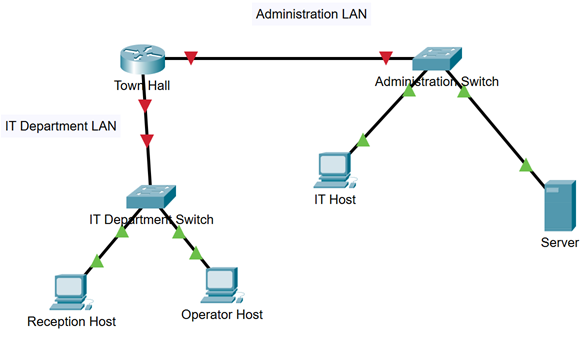
You are not required to configure the IT Department Switch, and you will not be able to access it in this practice skills assessment activity.
All IOS device configurations should be completed from a direct terminal connection to the device console. In addition, many values that are required to complete the configurations have not been given to you. In those cases, create the values that you need to complete the requirements. For values that have been supplied to you, they must be entered exactly as they appear in order for you to get full credit for your configuration.
If the network is configured correctly, all hosts should be able to connect to each other.
You will practice and be assessed on the following skills:
-
- Configuration of initial IOS device settings
- Design and calculation of IPv4 addressing
- Configuration of IOS device interfaces including IPv4 and IPv6 addressing when appropriate
- Addressing of network hosts with IPv4 and IPv6 addresses
- Enhancing device security, including configuration of the secure transport protocol for remote device management
- Configuration of a switch virtual management interface
Requirements by networking device:
Town Hall router:
-
- Configuration of initial router settings
- Interface configuration and IPv4 and IPv6 addressing
- Device security enhancement, or device hardening
- Secure transport for remote configuration connections as covered in the labs and Packet Tracers in the course
Administration Switch:
-
- Enabling basic remote management by Telnet
- PC and Server hosts:
- IPv4 full addressing Tracers in the course
- IPv6 addressing
Addressing Table
| Device | Interface | IP Address/Mask | Default Gateway |
|---|---|---|---|
| Town Hall | G0/0 | 192.168.1.126/27 | N/A |
| 2001:db8:acad:a::1/64 | N/A | ||
| fe80::1 | N/A | ||
| G0/1 | 192.168.1.158/28 | N/A | |
| 2001:db8:acad:b::1/64 | N/A | ||
| fe80::1 | N/A | ||
| Administration Switch | SVI | N/A | N/A |
| Reception Host | NIC | 192.168.1.100/27 | IT Department |
| 2001:db8:acad:a::ff/64 | |||
| Operator Host | NIC | 192.168.1.101/27 | IT Department |
| 2001:db8:acad:a::15/64 | |||
| IT Host | NIC | 192.168.1.150/28 | Administration |
| 2001:db8:acad:b::ff/64 | |||
| Server | NIC | 192.168.1.151/28 | Administration |
| 2001:db8:acad:b::15/64 |
Instructions
Step 1: Determine the IP Addressing Scheme.
Design an IPv4 addressing scheme and complete the Addressing Table based on the following requirements.
- Subnet the 192.168.1.0/24 network to provide 30 host addresses per subnet while wasting the fewest addresses.
- Assign the fourth subnet to the IT Department LAN.
- Assign the last network host address (the highest) in this subnet to the G0/0 interface on Town Hall.
- Starting with the fifth subnet, subnet the network again so that the new subnets will provide 14 host addresses per subnet while wasting the fewest addresses.
- Assign the second of these new 14-host subnets to the Administration LAN.
- Assign the last network host address (the highest) in the Administration LAN subnet to the G0/1 interface of the Town Hall router.
- Assign the second to the last address (the second highest) in this subnet to the VLAN 1 interface of the Administration Switch.
- Configure addresses on the hosts using any of the remaining addresses in their respective subnets.
-
- 25 – 2 ≥ 30 HA then 32 – 5 = /27 = 255.255.255.224
- subnet 1: 192.168.1.0 /27; subnet 2: 192.168.1.32 /27; subnet 3: 192.168.1.64 /27
- sub net 4: 192.168.1.96 /27 (IT Deparment LAN) – 192.168.1.97 – 192.168.1.126 (G0/0 Town Hall)
- sub net 5: 192.168.1.128 /27
- 24 – 2 ≥ 14 HA then 32 – 16 = /28 = 255.255.255.240
- subnet 0: 192.168.1.128 /28
- subnet 1: 192.168.1.144 /28 (Administration LAN) – 192.168.1.145 – 192.168.1.158 (G0/1 Town Hall) – 192.168.1.157 (VLAN 1 Administration switch)
- subnet 6: 192.168.1.160 /27; subnet 7: 192.168.1.192 /27; subnet 8: 192.168.1.224 /27
Step 2: Configure Host Addressing
Use the IPv4 addressing from Step 1 and the IPv6 addressing values provided in the Addressing Table to configure all host PCs with the correct addressing.
- Use the router interface link-local address as the IPv6 default gateways on the hosts.
- Complete the configuration of the server using the IPv4 addressing values from Step 1 and the values in the addressing table
Step 3: Configure the Town Hall Router.
- Configure the Town Hall router with all initial configurations that you have learned in the course so far:
-
- Configure the router hostname: Town-Hall
- Router> enable
- Router# configure terminal
- Router(config)# hostname Town-Hall
- Town-Hall(config)#
- Protect device configurations from unauthorized access with the encrypted privileged exec password.
- Town-Hall(config)# enable secret ensecP@555
- Secure all access lines into the router using methods covered in the course and labs.
- Town-Hall(config)# line console 0
- Town-Hall(config-line)# password consP@5555
- Town-Hall(config-line)# login
- Town-Hall(config-line)# exit
- Town-Hall(config)# line vty 0 4
- Town-Hall(config-line)# password vty0P@5555
- Town-Hall(config-line)# login
- Town-Hall(config-line)# transport input ssh
- Town-Hall(config-line)# exit
- Require newly-entered passwords to have a minimum length of 10 characters.
- Town-Hall(config)# security passwords min-length 10
- Prevent all passwords from being viewed in clear text in device configuration files.
- Town-Hall(config)# service password-encryption
- Configure a banner warning message for unauthorized users.
- Town-Hall(config)# banner motd # Authorized Access Only! #
- Configure the router to only accept in-band management connections over the protocol that is more secure than Telnet, as was done in the labs and PT activities. Use the value 1024 for encryption key strength.
- Town-Hall(config)# ip domain-name ccna.com
- Town-Hall(config)# crypto key generate rsa
- How many bits in the modulus [512]: 1024
- Town-Hall(config)# ip ssh version 2
- Configure local user authentication for in-band management connections. Create a user with the name netadmin and a secret password of Cisco_CCNA7.
- Town-Hall(config)# username netadmin secret Cisco_CCNA7
- Configure the router hostname: Town-Hall
- Configure the two Gigabit Ethernet interfaces using the IPv4 addressing values that you calculated and the IPv6 values provided in the addressing table.
-
- Reconfigure the link local addresses to the value shown in the table.
- Town-Hall(config)# interface G0/0
- Town-Hall(config-if)# description Connected to IT Department LAN
- Town-Hall(config-if)# ip address 192.168.1.126 255.255.255.224
- Town-Hall(config-if)# ipv6 address 2001:db8:acad:a::1/64
- Town-Hall(config-if)# ipv6 address fe80::1 link-local
- Town-Hall(config-if)# no shutdown
- Town-Hall(config-if)# exit
- Town-Hall(config)# interface G0/1
- Town-Hall(config-if)# description Connected to Administration LAN
- Town-Hall(config-if)# ip address 192.168.1.158 255.255.255.240
- Town-Hall(config-if)# ipv6 address 2001:db8:acad:b::1/64
- Town-Hall(config-if)# ipv6 address fe80::1 link-local
- Town-Hall(config-if)# no shutdown
- Town-Hall(config-if)# exit
- Document the interfaces in the configuration file.
- Town-Hall(config)# exit
- Town-Hall# copy running-config startup-config
- Reconfigure the link local addresses to the value shown in the table.
Step 4: Configure the Administration Switch.
Configure Administration Switch for remote management over Telnet.
- Configure VLAN 1 as the SVI.
-
- Switch_2> enable
- Switch_2# configure terminal
- Switch_2(config)# enable secret ensecP@555
- Switch_2(config)# line vty 0 4
- Switch_2(config-line)# password vty0P@5555
- Switch_2(config-line)# login
- Switch_2(config-line)# transport input telnet
- Switch_2(config-line)# exit
-
- Configure IPv4 addressing according to your work in Step 1.
-
- Switch_2(config)# interface vlan 1
- Switch_2(config-if)# ip address 192.168.1.157 255.255.255.240
- Switch_2(config-if)# no shutdown
- Switch_2(config-if)# exit
- Switch_2(config)# ip default-gateway 192.168.1.158
-
- Be sure that the switch is able to accept connections from hosts on other networks.